You diligently write out your to-do list, a satisfying cascade of tasks, only to find yourself at the end of the day with half of them unchecked and a nagging sense of overwhelm. Or perhaps you've heard whispers of a more structured approach, a productivity powerhouse called time blocking, that promises to tame your chaotic schedule.
In the endless quest for peak efficiency, the battle between these two titans of task management — to-do list vs time blocking — rages on. Both aim to help you organize your day, but they tackle the problem from fundamentally different angles. One gives you a list of intentions; the other demands a commitment to action. But in the real world of distractions, unexpected demands, and fluctuating energy levels, which boosts productivity more?
As an expert in navigating the daily deluge of tasks, I've seen countless individuals wrestle with this very question. This isn't just about picking a tool; it's about finding the best daily planning method that genuinely aligns with your working style, your brain's unique wiring, and the demands of your job. Forget the fleeting productivity hacks time blocking promises that don't stick. We're talking about sustainable strategies to truly organize your day efficiently.
In this comprehensive guide, we'll dive deep into the mechanics of both systems, explore their strengths and weaknesses, and uncover whether one truly reigns supreme or if their power lies in combination. By the end, you'll have a clear roadmap to help you plan your day effectively and finally conquer that nagging feeling of being busy but unproductive.
1. What is better: a to-do list or time blocking?
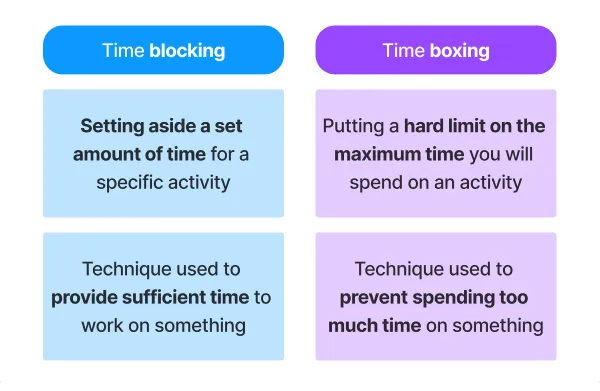


This is the central question for anyone striving to organize your day efficiently, and the truth is, what is better: a to-do list or time blocking? isn't a simple either/or. Each method excels in different areas, and their "betterness" largely depends on your personality, the type of work you do, and the specific challenges you face with your productivity.
Let's break down their core philosophies and why one might be a better fit than the other for certain situations.
The To-Do List: Your Intentions & Flexibility
A to-do list is essentially a compilation of tasks you intend to complete. It's a mental offload, a brain dump, providing a comprehensive overview of everything you need to remember.
-
Pros of a To-Do List:
-
Simplicity: Easy to create and understand. Just jot down tasks as they come to mind.
-
Flexibility: It's adaptable. You can reorder tasks, add new ones, or defer old ones easily. This makes it a great starting point for anyone looking for to-do list productivity tips.
-
Mental Clarity: Getting tasks out of your head and onto paper (or a screen) reduces cognitive load and can alleviate stress.
-
Sense of Accomplishment: Checking off items provides satisfying visual feedback and a sense of progress. This is a primary to-do list benefits and drawbacks of the method.
-
Comprehensive Overview: It allows you to see all your responsibilities in one place.
-
-
When a To-Do List Excels:
-
For capturing all incoming tasks and ideas.
-
When your day is highly unpredictable, and you need to react to new priorities constantly.
-
For low-stakes tasks that don't require deep focus or specific time slots.
-
As a preliminary step before more structured planning.
-
Time Blocking: Your Commitment & Focus
Time blocking, also known as calendar blocking, is a time management technique where you schedule specific blocks of time for specific tasks or activities in your calendar. Instead of just listing tasks, you're explicitly allocating when and for how long you will work on them.
-
Pros of Time Blocking:
-
Fosters Deep Work: By dedicating uninterrupted blocks of time, you create space for highly focused, concentrated work, which is a key component of focus strategies for work.
-
Realistic Planning: It forces you to confront the reality of how much time tasks actually take, leading to more realistic scheduling.
-
Reduces Procrastination: When a task has a designated time slot, you're more likely to start it. This helps answer which method helps reduce procrastination more?
-
Prevents Overcommitment: Seeing your scheduled time visually helps you avoid packing too much into your day.
-
Prioritization: It inherently forces you to prioritize by assigning time to what's most important, rather than just what's urgent.
-
Minimizes Context Switching: By grouping similar tasks (e.g., all emails at one time, all meetings at another), it reduces the mental cost of switching between different types of work.
-
-
When Time Blocking Excels:
-
For individuals with demanding schedules and competing priorities.
-
When you need to carve out time for deep, focused work (e.g., creative tasks, coding, writing).
-
For project management where specific milestones need dedicated attention.
-
For those who struggle with procrastination or getting started on tasks.
-
The Verdict on "Better":
Neither is inherently "better" in all scenarios.
-
If your main problem is forgetting tasks or needing a flexible overview, a to-do list is fantastic.
-
If your main problem is procrastination, distraction, or struggling to make progress on important tasks, then time blocking will likely be far more effective for time blocking vs to-do list productivity.
Many productivity experts, including myself, advocate for a combination of both, which we'll discuss later. But fundamentally, a to-do list is about what you want to do, while time blocking is about when you will actually do it. And action, not just intention, is what truly boosts productivity.
People Also Ask: What is better: a to-do list or time blocking? What is better: a to-do list or time blocking? is not a simple choice, as each excels in different areas. A to-do list offers simplicity, flexibility, and a comprehensive overview of tasks, making it great for initial brain dumps and for general to-do list productivity tips. However, for achieving significant time blocking vs to-do list productivity, time blocking often comes out on top. It forces realistic planning, fosters deep work by dedicating specific time slots, and is generally more effective at helping to reduce procrastination more by creating a commitment to action. While a to-do list benefits and drawbacks include its ease of use but lack of accountability, time blocking provides the structured environment needed for focused execution, particularly when you need to organize your day efficiently and implement effective focus strategies for work.
2. Does time blocking actually improve productivity?


The central claim of time blocking is that it boosts productivity, but does time blocking actually improve productivity? The overwhelming consensus from productivity experts, anecdotal evidence from highly successful individuals (like Bill Gates and Elon Musk), and a growing body of psychological principles suggests a resounding yes.
Here's why time blocking is so effective at enhancing productivity:
-
Combats Procrastination and Indecision:
-
One of the biggest productivity killers is simply not knowing what to work on next or dreading a difficult task. When you've explicitly blocked out time for "Project X" from 10:00 AM to 12:00 PM, the decision is already made. You just start. This directly answers which method helps reduce procrastination more?
-
It removes the mental friction of choosing, allowing you to dive straight into work.
-
-
Fosters Deep Work and Flow States:
-
By scheduling uninterrupted blocks for specific tasks, time blocking creates an environment conducive to "deep work" – highly focused, undistracted concentration on a single task. This is a core component of effective focus strategies for work.
-
When you know you have a dedicated, protected block of time, your brain is less likely to wander, and you're more likely to enter a "flow state" where you are fully immersed and highly productive.
-
-
Encourages Realistic Planning:
-
Unlike a never-ending to-do list where you can jot down 20 tasks for a single day, time blocking forces you to confront the finite nature of time. You quickly realize you only have X number of hours, and this compels you to be more realistic about what you can truly accomplish. This is part of what makes it the best daily planning method for many.
-
You have to estimate how long tasks will actually take, leading to better planning and less overwhelm.
-
-
Reduces Context Switching (and its Costs):
-
Switching between different types of tasks (e.g., email, then a creative task, then a quick chat, then back to a different email) is mentally exhausting and inefficient. Each switch comes with a "cost" in terms of lost focus and ramp-up time.
-
Time blocking allows you to group similar tasks together (e.g., "Email Hour," "Meeting Block," "Creative Writing Block"). This task batching within a time block reduces context switching, making your work more efficient. (We'll delve more into what’s the difference between time blocking and task batching? later).
-
-
Builds Accountability:
-
When you commit a task to your calendar, it feels more concrete than a line item on a list. It's a "meeting with yourself" that you're less likely to skip. This external commitment (even if just to your calendar) creates a psychological push for follow-through.
-
-
Manages Distractions More Effectively:
-
Knowing you have dedicated time for a task makes it easier to say "no" to interruptions. You can tell colleagues you'll get back to them after your "focused work block," or ignore non-urgent notifications during that time. This is key for distractions remote work vs office management.
-
-
Provides a Clear Visual Roadmap:
-
Seeing your entire day laid out on a calendar provides a clear visual guide. You know exactly what you should be doing at any given moment, reducing decision fatigue and increasing confidence. This makes it a powerful productivity planner vs Google Calendar strategy (especially when used with Google Calendar).
-
While it requires an initial investment of time and discipline, the structured approach of time blocking consistently leads to greater output, higher quality work, and a more realistic understanding of one's own capacity, all contributing to a significant boost in overall productivity.
People Also Ask: Does time blocking actually improve productivity? Yes, time blocking does actually improve productivity significantly. It combats procrastination and indecision by pre-determining what to work on, making it a highly effective method to help reduce procrastination more. By creating dedicated, uninterrupted intervals, it fosters deep work and flow states, which are essential focus strategies for work. Time blocking forces realistic planning by making you confront time limitations, distinguishing it from a sprawling to-do list. It also reduces the mental cost of context switching through task batching, and builds accountability by making commitments visible on your calendar. Overall, time blocking provides a structured roadmap for your day, making it a compelling candidate for the best daily planning method and a powerful strategy within any productivity planner vs Google Calendar approach, ultimately boosting time blocking vs to-do list productivity.
3. How do I start time blocking my day?
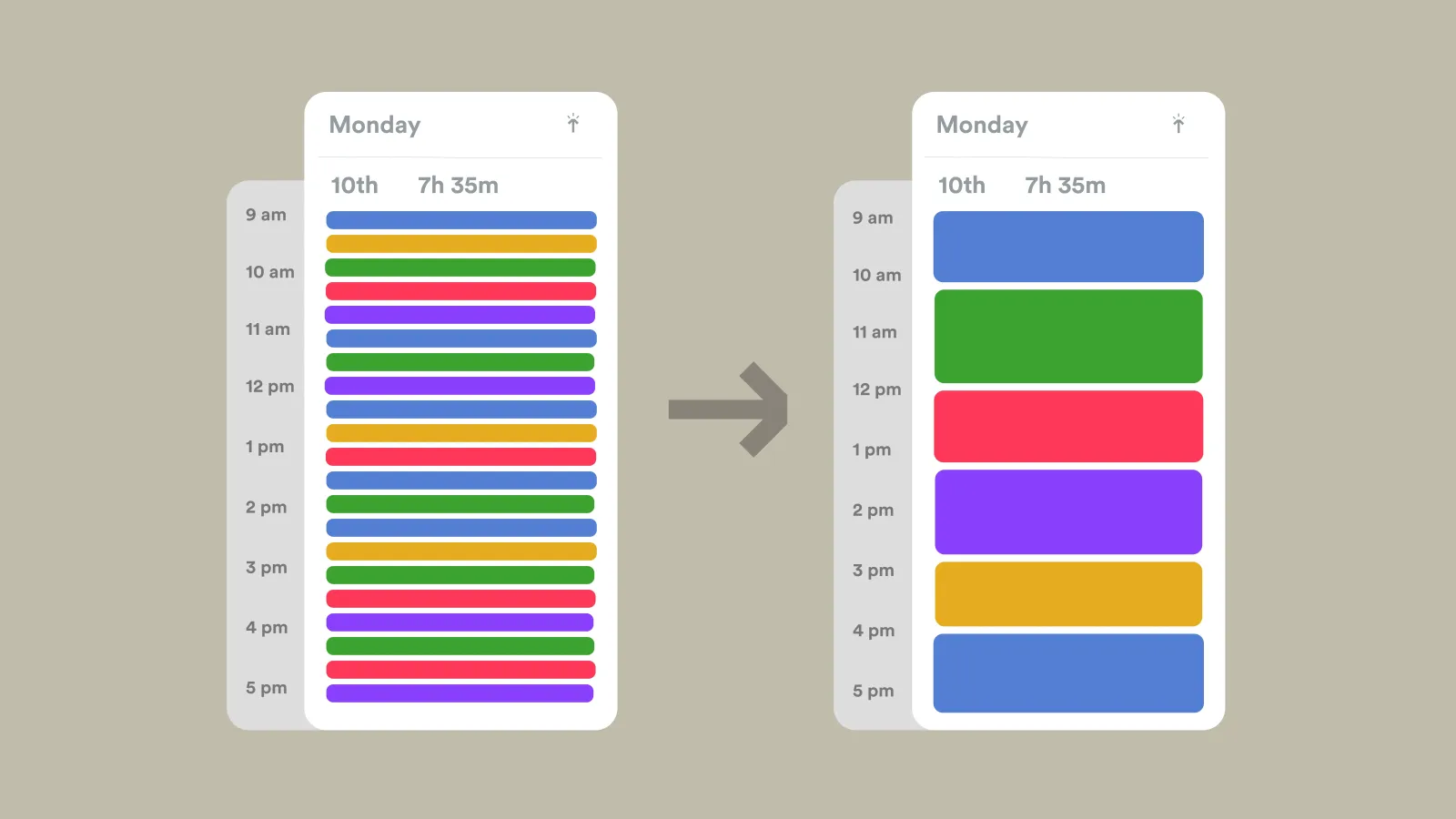

So, you're convinced that time blocking holds the key to boosting your productivity. That's fantastic! But the idea of meticulously scheduling every minute can feel daunting. How do I start time blocking my day? It's simpler than you think, and like any new habit, it benefits from a gradual approach.
Here's a step-by-step guide to get you started with time blocking:
-
Choose Your Tool:
-
You'll need a calendar. Digital calendars are highly recommended for their flexibility (easy to move blocks, recurring events).
-
Google Calendar (free and widely used, excellent for this purpose – making it a top choice when considering productivity planner vs Google Calendar).
-
Outlook Calendar, Apple Calendar, etc.
-
-
Physical planners can also work, but they are less flexible for adjustments.
-
-
Do a Brain Dump (Your Master To-Do List):
-
Before you block time, you need to know what you need to do. Spend 10-15 minutes writing down every single task, appointment, idea, and obligation swirling in your head. Don't filter, just list.
-
This initial to-do list is your raw material. It forms the foundation for your best daily planning method.
-
-
Estimate Time for Each Task:
-
Go through your master list and, next to each item, jot down a realistic estimate of how long it will take. Be honest! Most people underestimate.
-
Pro-Tip: Add a 20-30% buffer to your estimates, especially for complex or new tasks.
-
-
Identify Fixed Commitments First:
-
Look at your calendar and block out all your non-negotiable, fixed appointments first. These are your anchors.
-
Meetings (work and personal)
-
Appointments (doctor, dentist, etc.)
-
Commute time (if applicable)
-
Meal breaks (lunch, dinner)
-
Exercise or other non-negotiable personal activities
-
-
These blocks are sacred; they dictate the remaining "open" time you have.
-
-
Schedule Your "High-Impact" (Frog) Tasks:
-
Look at your remaining to-do list and identify the 1-3 most important, impactful tasks for the day – the ones that will move the needle on your most important goals or prevent future problems. These are often the "frogs" you need to eat.
-
Block Time: Schedule dedicated, uninterrupted blocks for these tasks. Often, the morning is best for your most challenging work when your energy and focus are highest. Aim for 60-90 minute blocks for deep work (focus strategies for work).
-
-
Batch Similar Tasks:
-
Group smaller, similar tasks together to reduce context switching. This is where task batching comes in.
-
Email Block: Schedule 1-2 specific times a day to check and respond to emails, rather than constantly reacting.
-
Admin Block: Group tasks like invoicing, expense reports, quick calls, etc.
-
Communication Block: For responding to Slack/Teams messages, making brief calls.
-
-
Allocate time blocks for these batches. (Understanding what’s the difference between time blocking and task batching? is key here).
-
-
Include Breaks and Buffer Time:
-
Breaks: Schedule short 5-10 minute breaks every hour or two. Get up, stretch, grab water. These are vital for sustained time blocking vs to-do list productivity.
-
Buffer Time: Add short 15-30 minute buffer blocks between larger tasks or meetings. This accounts for overruns, unexpected interruptions, and allows you to prepare for the next task.
-
-
Review and Adjust:
-
At the end of each day (or first thing in the morning), review your time block for the next day.
-
Be Flexible: Life happens! Don't be afraid to move blocks around if priorities shift. The goal isn't rigidity, but intention.
-
Refine Estimates: Over time, you'll get better at estimating how long tasks take, making your time blocks more accurate.
-
-
Start Small and Iterate:
-
Don't try to perfectly time block your entire week on day one. Start by blocking out just a few key tasks or one day at a time.
-
Experiment with different block lengths and task groupings. See what works for your energy levels and concentration spans.
-
Consistency over perfection is the goal when learning how to stay consistent with time blocking.
-
By following these steps, you'll move beyond just listing tasks to actively scheduling your time, transforming your intentions into actionable commitments and significantly improving how you plan your day effectively.
People Also Ask: How do I start time blocking my day? To start time blocking your day, begin by choosing a digital calendar like Google Calendar (productivity planner vs Google Calendar is excellent here). First, do a comprehensive brain dump to create your master to-do list, then estimate the time required for each task, adding a buffer. Next, block out all fixed commitments like meetings and breaks. Then, strategically schedule your high-impact tasks during your peak productivity times, often in focused 60-90 minute blocks (focus strategies for work). Batch similar smaller tasks like emails or admin into dedicated blocks (what’s the difference between time blocking and task batching?). Crucially, include short breaks and buffer time between blocks. Finally, review and adjust your schedule daily, starting small and iterating to find what works best for you, aiming for consistency to master how to stay consistent with time blocking and ultimately establish the best daily planning method for you to plan your day effectively.
4. Why do to-do lists sometimes fail?
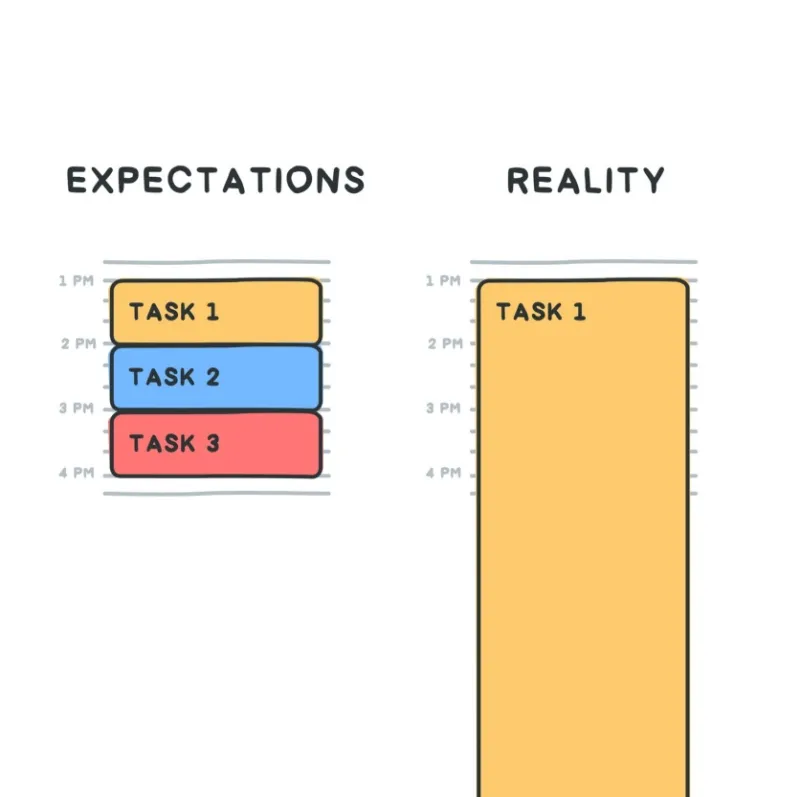

The ubiquitous to-do list is a staple in personal and professional productivity, offering the simple satisfaction of ticking off completed items. However, many people find themselves frustrated by their to-do lists, leading to a sense of overwhelm rather than accomplishment. So, why do to-do lists sometimes fail? It's not the list itself that's the problem, but how it's used – or rather, misused.
Here are the common reasons why to-do lists often fall short of their productivity-boosting potential:
-
They Are Too Long and Overwhelming:
-
Brain Dump Syndrome: While a brain dump is a great start, a long list without prioritization can feel insurmountable. Seeing 30+ items for a single day immediately triggers overwhelm and demotivation. This impacts the overall to-do list benefits and drawbacks.
-
Unrealistic Expectations: We often overestimate what we can realistically achieve in a day, leading to lists that are simply too ambitious.
-
-
Lack of Prioritization:
-
Everything Feels Urgent: A simple list doesn't inherently tell you what's most important. Without a system for identifying top priorities (like the Eisenhower Matrix vs time blocking can help with, or other prioritization frameworks), you end up working on urgent but low-impact tasks.
-
"Picking the Easiest": Faced with a long list, we often default to doing the easiest, quickest tasks first, leaving the important, harder ones (the "frogs") untouched.
-
-
Tasks Are Too Vague or Large:
-
"Write Report": This is a huge task that can take hours or days. It's not actionable. Such large items on a list contribute to feeling stuck and not knowing where to start.
-
Lack of Clear Next Steps: If a task isn't broken down into smaller, actionable steps, it often languishes on the list.
-
-
No Time Allocation (The Core Flaw Compared to Time Blocking):
-
This is the fundamental difference in the to-do list vs time blocking debate. A to-do list tells you what to do, but not when or for how long.
-
"Time Debt": Without allocating specific time, tasks on a to-do list become "time debt" – you know you owe them attention, but you haven't decided when to pay up. This makes them highly susceptible to procrastination.
-
Reactive vs. Proactive: To-do lists often encourage a reactive approach, where you pick the next item that feels urgent rather than proactively scheduling your most important work.
-
-
Distractions and Interruptions:
-
Even with a well-prioritized list, if you don't carve out dedicated time for focused work, you're constantly pulled away by emails, notifications, and colleagues, preventing any meaningful progress. This is where focus strategies for work fall short if not paired with time allocation.
-
-
Lack of Accountability (to Yourself):
-
There's no commitment beyond simply writing it down. It's easy to push things to tomorrow with little consequence. Time blocking, by contrast, creates a "meeting with yourself" in your calendar, which feels harder to skip.
-
-
Forgetting Context or Required Resources:
-
A simple list might not remind you that "Call Client X" requires you to first look up their file, or that "Project Y" needs specific software access. Without this context, starting the task becomes more challenging.
-
While to-do lists serve as excellent capture tools and memory aids, their failure often stems from their passive nature. They outline intentions but don't enforce action or realistically account for the finite nature of time, which is precisely where time blocking steps in to fill the gap.
People Also Ask: Why do to-do lists sometimes fail? To-do lists sometimes fail because they are often too long and overwhelming, leading to unrealistic expectations. A major drawback is the lack of prioritization, meaning important tasks get lost among less critical ones, unlike the clarity offered by the Eisenhower Matrix vs time blocking. Tasks are frequently too vague or large, lacking actionable steps. Crucially, a to-do list lacks time allocation, which is the core difference in the to-do list vs time blocking debate; it tells you what to do but not when, making tasks susceptible to procrastination and hindering effective focus strategies for work. Additionally, distractions and interruptions derail progress, and there's often a lack of accountability for one's self. These factors contribute to the to-do list benefits and drawbacks, highlighting its role as a capture tool that needs further strategic planning to truly boost productivity.
5. Can I combine time blocking with a to-do list?
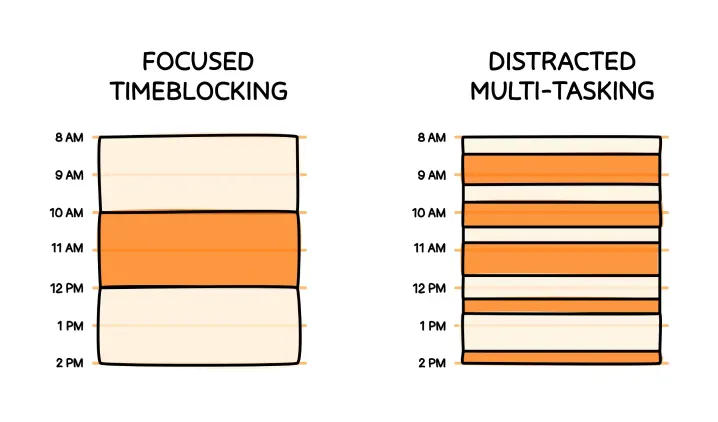

Absolutely! And in fact, the answer to can I combine time blocking with a to-do list? is a resounding yes, and this combination is often hailed as the best daily planning method for maximizing time blocking vs to-do list productivity. This hybrid approach leverages the strengths of both systems while mitigating their individual weaknesses.
Here's how to effectively combine a to-do list with time blocking:
-
Use Your To-Do List as a Master Task Repository (The "Brain Dump" Phase):
-
Capture Everything: Your to-do list (or a specific productivity planner vs Google Calendar software that allows for simple list creation) becomes your central hub for capturing every task, idea, and commitment that comes your way. Don't filter at this stage. This is where you leverage the to-do list benefits and drawbacks by benefiting from its sheer simplicity as a capture tool.
-
Break Down Large Tasks: For any vague or large tasks on this master list (e.g., "Write report"), break them down into smaller, actionable steps (e.g., "Research data for report," "Outline report sections," "Draft intro for report").
-
-
Prioritize Your To-Do List (The "What's Important Today?" Phase):
-
Before you start blocking time for the day or week, review your master to-do list.
-
Identify Your Daily/Weekly Priorities: Pick out the 1-3 most critical tasks that absolutely must get done. These are your "non-negotiables" or "Most Important Tasks (MITs)."
-
Utilize Prioritization Frameworks: This is where concepts like the Eisenhower Matrix vs time blocking (Urgent/Important) can come in handy. Label tasks by priority (A, B, C or 1, 2, 3) or category.
-
-
Allocate Time Blocks on Your Calendar (The "When Will I Do It?" Phase):
-
Now, open your calendar (digital is best for this, like Google Calendar).
-
Schedule Fixed Commitments: First, block out all your meetings, appointments, commutes, and non-negotiable personal breaks (lunch, exercise).
-
Block Your Priorities: Take those 1-3 high-priority tasks from your curated to-do list and assign specific, dedicated time blocks for them in your calendar. These are your "meeting with yourself" blocks.
-
Batch Smaller Tasks: Group similar, smaller tasks from your list (e.g., "return calls," "process emails," "quick admin tasks") and assign dedicated time blocks for these batches. This directly uses the concept of what’s the difference between time blocking and task batching? to your advantage.
-
Buffer Time: Remember to add buffer time between blocks to account for overruns or unexpected interruptions.
-
-
Use Your To-Do List Within Time Blocks (The "Flexibility Within Structure" Phase):
-
During a specific time block (e.g., "Project X Deep Work – 9:00 AM-11:00 AM"), you can refer to the relevant sub-tasks from your to-do list for that project.
-
For your "Admin Block," you can work through a list of smaller administrative tasks.
-
This provides structure while still allowing for the flexibility of picking off items from a list within a designated period.
-
Benefits of This Combined Approach:
-
Clarity & Action: You get the mental clarity of a comprehensive list combined with the actionable commitment of scheduled time.
-
Reduced Procrastination: When a task from your list is now on your calendar, you're much more likely to start it. This directly helps reduce procrastination more.
-
Realistic Expectations: You see how much time you actually have, preventing the overflow that often makes to-do lists fail (why do to-do lists sometimes fail?).
-
Enhanced Focus: Dedicated time blocks for important tasks lead to deeper, more concentrated work (focus strategies for work).
-
Adaptability: The to-do list allows you to capture new tasks quickly, and you can then decide when to strategically fit them into your calendar.
This hybrid model truly offers the power to how to organize your day efficiently and how to plan your day effectively, harnessing the best of both worlds for optimal productivity.
People Also Ask: Can I combine time blocking with a to-do list? Yes, you can combine time blocking with a to-do list, and it's widely considered the best daily planning method for maximizing time blocking vs to-do list productivity. First, use your to-do list as a master task repository to capture everything, leveraging its to-do list benefits and drawbacks for initial capture. Then, prioritize this list, identifying your most important tasks (perhaps using insights from the Eisenhower Matrix vs time blocking). Next, allocate specific time blocks on your calendar (like Google Calendar, an excellent productivity planner vs Google Calendar option) for these priority tasks and to batch similar smaller tasks (what’s the difference between time blocking and task batching?). Finally, use your detailed to-do list items within these allocated time blocks as a guide. This combined approach addresses why do to-do lists sometimes fail? by adding accountability, helps reduce procrastination more, and creates structured time for effective focus strategies for work, ultimately helping you plan your day effectively.
6. What are the disadvantages of time blocking?


While time blocking is a powerful productivity tool, it's not without its drawbacks. Understanding what are the disadvantages of time blocking? is crucial for setting realistic expectations and adapting the method to your specific needs. No single best daily planning method is perfect for everyone or every situation.
Here are the common challenges associated with time blocking:
-
Lack of Flexibility and Rigidity:
-
Unexpected Interruptions: Life happens. An urgent email, an impromptu meeting, or a personal emergency can completely derail a meticulously planned time block. This is a primary criticism when comparing to-do list vs time blocking.
-
Feeling Trapped: Some individuals feel overly constrained by a rigid schedule, leading to stress rather than focus. If your job involves constant reactivity (e.g., customer support, emergency services), strict time blocking might be impractical.
-
Frustration: When blocks are constantly interrupted or pushed, it can lead to frustration and a feeling of failure, potentially making you abandon the method.
-
-
Over-Optimization and Analysis Paralysis:
-
Spending Too Much Time Planning: It's possible to get caught up in the act of planning itself, meticulously crafting the "perfect" time block schedule, rather than actually doing the work. This defeats the purpose of productivity hacks time blocking aims to achieve.
-
Estimating Difficulty: Accurately estimating how long tasks will take is hard, especially for complex or unfamiliar work. Consistent over- or underestimation can make time blocking feel ineffective.
-
-
Requires High Self-Discipline:
-
Sticking to the Schedule: Unlike a boss setting a meeting, your time blocks are "meetings with yourself." It takes significant discipline to respect these blocks, especially when there's an urge to procrastinate or switch tasks. This makes how to stay consistent with time blocking a common challenge.
-
Resisting Distractions: While time blocking helps manage them, it doesn't eliminate them. You still need the willpower to ignore notifications or politely defer interruptions during your focused blocks (focus strategies for work).
-
-
Not Ideal for Spontaneous or Creative Work (for some):
-
While it can create space for deep work, some highly creative individuals find that forcing creativity into strict time slots stifles it. Ideas often come at unexpected times, and a rigid schedule might not accommodate that flow.
-
"Flow State" Disruption: If you happen to be in a strong flow state and your time block ends, forcibly stopping can be disruptive.
-
-
Perceived Loss of Autonomy:
-
For those who value spontaneity and hate feeling controlled, time blocking can feel like a self-imposed prison, even if it's for their own benefit.
-
-
Does Not Automatically Prioritize (Requires Pre-Planning):
-
While time blocking forces you to allocate time, it doesn't inherently tell you what tasks are most important. You still need a separate prioritization step (like using a filtered to-do list or an Eisenhower Matrix vs time blocking approach) before you can effectively block your time. If you just block whatever comes to mind, you might still spend time on low-value tasks.
-
Despite these disadvantages, for many, the benefits of structure and forced focus far outweigh the challenges. The key is to implement time blocking with a degree of flexibility and to adapt it to your unique working style and environment.
People Also Ask: What are the disadvantages of time blocking? The disadvantages of time blocking include a significant lack of flexibility and rigidity, as unexpected interruptions can easily derail a meticulously planned schedule, causing frustration and a feeling of being trapped, especially when compared to a more adaptable to-do list vs time blocking. It can lead to over-optimization and analysis paralysis, where too much time is spent planning rather than doing, undermining the intent of productivity hacks time blocking. This method also requires high self-discipline to stick to the planned blocks, making how to stay consistent with time blocking a common hurdle. It might not be ideal for highly spontaneous or creative work, potentially disrupting flow states and focus strategies for work. Lastly, time blocking does not automatically prioritize; it still requires a pre-planning step (perhaps using an Eisenhower Matrix vs time blocking approach) to ensure the right tasks are being allocated time, otherwise, you might still spend time on low-value activities, impacting overall productivity.
7. Which method helps reduce procrastination more?


When it comes to battling that insidious enemy of productivity, procrastination, the question of which method helps reduce procrastination more? between a to-do list vs time blocking has a fairly clear answer: time blocking.
Here's why time blocking is generally more effective at reducing procrastination, and why to-do lists often fall short:
Why To-Do Lists Fall Short with Procrastination:
-
Lack of Commitment: A task on a to-do list is merely an intention. It's easy to look at a list and say, "I'll do that later," or "That can wait." There's no inherent time pressure or built-in accountability.
-
Overwhelm: As discussed, a long, undifferentiated to-do list can be incredibly overwhelming. When faced with too many choices or vague, large tasks, the brain often defaults to doing nothing or picking the easiest, least important task (which is a form of procrastination).
-
No Designated Start Time: This is crucial. If a task doesn't have a specific start time, you continually defer the decision of when to begin. The mental friction of "starting" is often a major trigger for procrastination.
-
No "Meeting With Yourself": A to-do list lacks the psychological weight of a calendar entry. You wouldn't typically skip a scheduled meeting with a colleague, but it's much easier to blow off a task on a list.
Why Time Blocking Excels at Reducing Procrastination:
-
Pre-Decision Making: Time blocking forces you to make the decision about when you will work on a task before the time comes. When the time block arrives, the decision is already made. You simply execute. This removes a significant barrier to starting.
-
Built-in Accountability (to Yourself): By putting a task on your calendar, you've created a "meeting with yourself." Psychologically, this feels more like an appointment you need to keep. This commitment helps to how to stay consistent with time blocking.
-
Forces Task Breakdown: To effectively time block, you often need to estimate how long a task will take, which naturally encourages you to break down large, daunting tasks into smaller, more manageable blocks. This makes the task less intimidating and easier to start.
-
Creates "Sacred Time" for Focus: When you know you have a dedicated block for a high-priority task, you're more likely to protect that time from distractions and interruptions. This commitment to focus strategies for work helps overcome the urge to procrastinate by creating a clear path forward.
-
Reduces Choice Overload: Instead of staring at a long to-do list and wondering what to do, your calendar tells you exactly what you should be working on at that moment. This reduces decision fatigue, a common precursor to procrastination.
-
Leverages the "Zeigarnik Effect": This psychological phenomenon suggests that people remember unfinished or interrupted tasks better than completed ones. Once you start a task in a time block, the urge to finish it (or at least make significant progress) is stronger.
While time blocking isn't a magic bullet that eliminates procrastination entirely, it provides a powerful framework that directly addresses many of the psychological triggers for delaying tasks. It transforms intentions into commitments and provides a clear, actionable roadmap for your day, making it significantly more effective than a simple list alone in the fight against procrastination.
People Also Ask: Which method helps reduce procrastination more? When comparing to-do list vs time blocking, time blocking is significantly more effective at helping to reduce procrastination more. A to-do list often fails because it's just an intention without a commitment, leading to overwhelm and no designated start time. In contrast, time blocking combats procrastination by forcing pre-decision making about when a task will be done, creating built-in accountability (a "meeting with yourself" in your calendar), and encouraging task breakdown. It establishes "sacred time" for focus strategies for work, making it harder to get distracted or defer. This structured approach, a key aspect of time blocking vs to-do list productivity, leverages the power of commitment to ensure you actually start and make progress on your most important tasks, improving your ability to plan your day effectively.
8. What is the best productivity method for ADHD?


For individuals with ADHD (Attention-Deficit/Hyperactivity Disorder), traditional productivity methods can often fall short due to challenges with executive functions like planning, prioritization, time management, and sustained focus. So, what is the best productivity method for ADHD? While no single method is a cure-all, time blocking for ADHD is often highly recommended and can be incredibly effective when adapted to specific ADHD needs.
Here's why time blocking, combined with certain strategies, is particularly beneficial for ADHD, and why the standard to-do list can be problematic:
Why Standard To-Do Lists Can Be Problematic for ADHD:
-
Overwhelm: A long, undifferentiated to-do list can trigger immediate overwhelm, leading to paralysis rather than action. The sheer volume of tasks can be paralyzing.
-
Difficulty Prioritizing: Deciding what's most important can be a significant hurdle for ADHD brains, which might struggle with evaluating long-term consequences versus immediate urgency or interest.
-
Lack of Structure/Accountability: Without external structure, tasks on a list can easily be forgotten, shifted, or procrastinated on, as there's no built-in commitment.
-
"Out of Sight, Out of Mind": If a task isn't in immediate view or on the mind, it can quickly vanish from consciousness.
Why Time Blocking is Often Highly Effective for ADHD:
-
Externalizes Executive Functions: Time blocking literally puts your plan for the day outside your head, on a calendar. This acts as an external brain, compensating for internal struggles with planning and organization. This is the core benefit of time blocking for ADHD.
-
Reduces Decision Fatigue: When a task is assigned a specific block, the decision of what to work on now is already made. This reduces the mental friction that often leads to procrastination and getting sidetracked.
-
Creates Clear Boundaries and Transitions:
-
Start/Stop Cues: Time blocks provide clear start and stop times, helping individuals with ADHD transition between tasks. Visual and auditory cues (e.g., calendar notifications) can reinforce these transitions.
-
Focus on One Task: By dedicating a block to a single task, it encourages hyperfocus (a common ADHD trait) on the right thing, rather than jumping between multiple distractions (focus strategies for work).
-
-
Incorporates Micro-Breaks & Movement:
-
ADHD brains often benefit from frequent, short breaks. Time blocking encourages scheduling these explicitly, preventing burnout and allowing for movement or a quick mental reset.
-
Pomodoro Technique Integration: Time blocking pairs perfectly with the Pomodoro Technique (25 minutes work, 5 minutes break), which is highly effective for ADHD due to its short, focused bursts.
-
-
Manages Distractions:
-
When you know you have a dedicated "deep work" block, it's easier to implement strategies like turning off notifications or closing unnecessary tabs, as you have a clear, time-limited objective.
-
Scheduling "distraction blocks" (e.g., specific times for checking social media or non-urgent emails) can also help contain them.
-
-
Realistic Time Estimation:
-
While challenging initially, repeatedly time blocking helps individuals with ADHD develop a more accurate sense of how long tasks actually take (often called "time blindness"). This improves future planning.
-
-
Gamification & Visual Progress:
-
Seeing blocks of time completed on a calendar can be highly motivating and provide a visual representation of progress, similar to checking items off a to-do list but with the added layer of actual time spent.
-
Key Adaptations for Time Blocking with ADHD:
-
Shorter Blocks: Start with shorter time blocks (e.g., 25-45 minutes) to match attention spans, interspersed with frequent breaks.
-
Buffer Time is Essential: Always include generous buffer time between tasks and meetings.
-
"Flexi-Blocks": Don't over-schedule every minute. Leave some open blocks for spontaneous tasks, unexpected interruptions, or just mental breaks.
-
Visual & Auditory Reminders: Use calendar notifications and alarms to signal the start and end of blocks.
-
Color-Coding: Use different colors for different types of tasks (e.g., deep work, meetings, admin, personal) to make your schedule visually intuitive.
-
Review and Reset: Be kind to yourself. If a day goes off track, don't abandon the system. Review what went wrong, adjust, and start fresh the next day. Consistency over perfection is key to how to stay consistent with time blocking.
While time blocking requires conscious effort, its inherent structure, emphasis on pre-planning, and ability to externalize executive functions make it a powerful tool for individuals with ADHD seeking to boost their productivity and manage their day effectively.
People Also Ask: What is the best productivity method for ADHD? For individuals with ADHD, time blocking is often considered the best productivity method, especially when adapted for time blocking for ADHD. Unlike a sprawling to-do list which can lead to overwhelm and difficulty prioritizing, time blocking externalizes executive functions, reduces decision fatigue by pre-determining tasks, and creates clear boundaries for focus, crucial for focus strategies for work. It encourages frequent micro-breaks and helps manage distractions remote work vs office. While initial time estimation can be challenging, consistent use helps improve "time blindness." Key adaptations include using shorter blocks, generous buffer time, and visual reminders. The structure and accountability inherent in time blocking help to reduce procrastination more and improve how to stay consistent with time blocking, making it highly effective for those seeking to plan their day effectively despite ADHD challenges.
9. How do I stay consistent with time blocking?


You've tried time blocking, felt the surge of productivity hacks time blocking promises, but then life happens, the schedule gets derailed, and suddenly you're back to chaotic days. How do I stay consistent with time blocking? is a question that plagues many, as consistency is truly where the long-term magic happens. It's less about perfect execution and more about resilience and adaptable habits.
Here's how to cultivate consistency with time blocking:
-
Start Small, Don't Over-Optimize:
-
Don't Block Every Minute: Especially at first, don't try to fill every single minute of your day. Start by blocking just your 1-3 most important tasks, and perhaps a general "admin block" and "email block."
-
Gradual Increase: As you get comfortable and see the benefits, you can gradually add more structure to your day. This prevents over-optimization and analysis paralysis that can lead to early abandonment.
-
-
Be Realistic with Time Estimates (and Add Buffers):
-
This is crucial. Most people underestimate how long tasks will take. Be generous with your estimates, especially at first.
-
Build in Buffer Time: Always add 15-30 minute buffer blocks between major tasks or meetings. This accounts for unexpected interruptions, overruns, and allows for mental transition. This is key to preventing frustration when things inevitably go off track.
-
-
Review and Re-Plan Daily (or at least 3 times a week):
-
End of Day Review: Spend 5-10 minutes at the end of each workday to review what you accomplished, what got pushed, and why. Then, quickly sketch out your blocks for the next day.
-
Morning Adjustment: Take another 5 minutes in the morning to make any final adjustments based on new priorities or changed circumstances.
-
This consistent review and adjustment loop is vital for adapting to reality and improving your planning accuracy over time.
-
-
Embrace Flexibility (It's a Guide, Not a Cage):
-
Your time block is a plan, not a rigid prison sentence. Life will throw curveballs. When a block gets derailed, don't abandon the entire system.
-
Re-Evaluate and Re-Block: Simply shift blocks around, adjust priorities, or defer non-essential tasks to another day. The tool is there to serve you, not the other way around. This separates successful time blockers from those who give up when their plan isn't "perfect."
-
Accept Imperfection: Some days, your plan will go completely off the rails. That's okay! Acknowledge it, learn from it, and reset for tomorrow. Don't let one bad day sabotage your long-term consistency.
-
-
Protect Your Blocks (Especially the "Deep Work" Ones):
-
Communicate your availability to colleagues ("I'm in a focus block until 11 AM").
-
Turn off non-essential notifications during your dedicated work periods (focus strategies for work).
-
Treat your time blocks like important meetings you wouldn't miss.
-
-
Integrate Breaks and Self-Care:
-
Burnout is a major cause of inconsistency. Schedule genuine breaks, lunch, exercise, and transition time. Your brain needs rest to perform consistently.
-
This is especially important for areas like time blocking for ADHD, where frequent mental resets are beneficial.
-
-
Use Visual Cues and Reminders:
-
Set calendar notifications to alert you when a block is starting and ending.
-
Use color-coding in your digital calendar to quickly see different types of tasks or priorities. This enhances the visual clarity of your productivity planner vs Google Calendar setup.
-
-
Pair with a Curated To-Do List:
-
As discussed earlier (can I combine time blocking with a to-do list?), use your to-do list as your capture tool and master repository. Then, select tasks from it to put into your time blocks. This ensures you're blocking the right things and not just filling time.
-
By treating time blocking as an adaptive tool rather than a rigid rule, and by focusing on daily adjustments and self-compassion, you can significantly improve your consistency and unlock its full potential for boosting productivity.
People Also Ask: How do I stay consistent with time blocking? To stay consistent with time blocking, it's crucial to start small, avoiding over-optimization and analysis paralysis by not blocking every minute immediately. Be realistic with time estimates, always including buffer time for unexpected events to prevent frustration. Review and re-plan daily or several times a week, embracing flexibility and recognizing that your schedule is a guide, not a rigid cage; don't abandon the system if a day goes off track. Protect your focus blocks from distractions (focus strategies for work) and integrate breaks and self-care to avoid burnout, especially when considering time blocking for ADHD. Utilize visual cues and reminders from your productivity planner vs Google Calendar to stay on track. Finally, pair it effectively with a curated to-do list (can I combine time blocking with a to-do list?) to ensure you're blocking time for your most important tasks, ultimately boosting your time blocking vs to-do list productivity.
10. What’s the difference between time blocking and task batching?
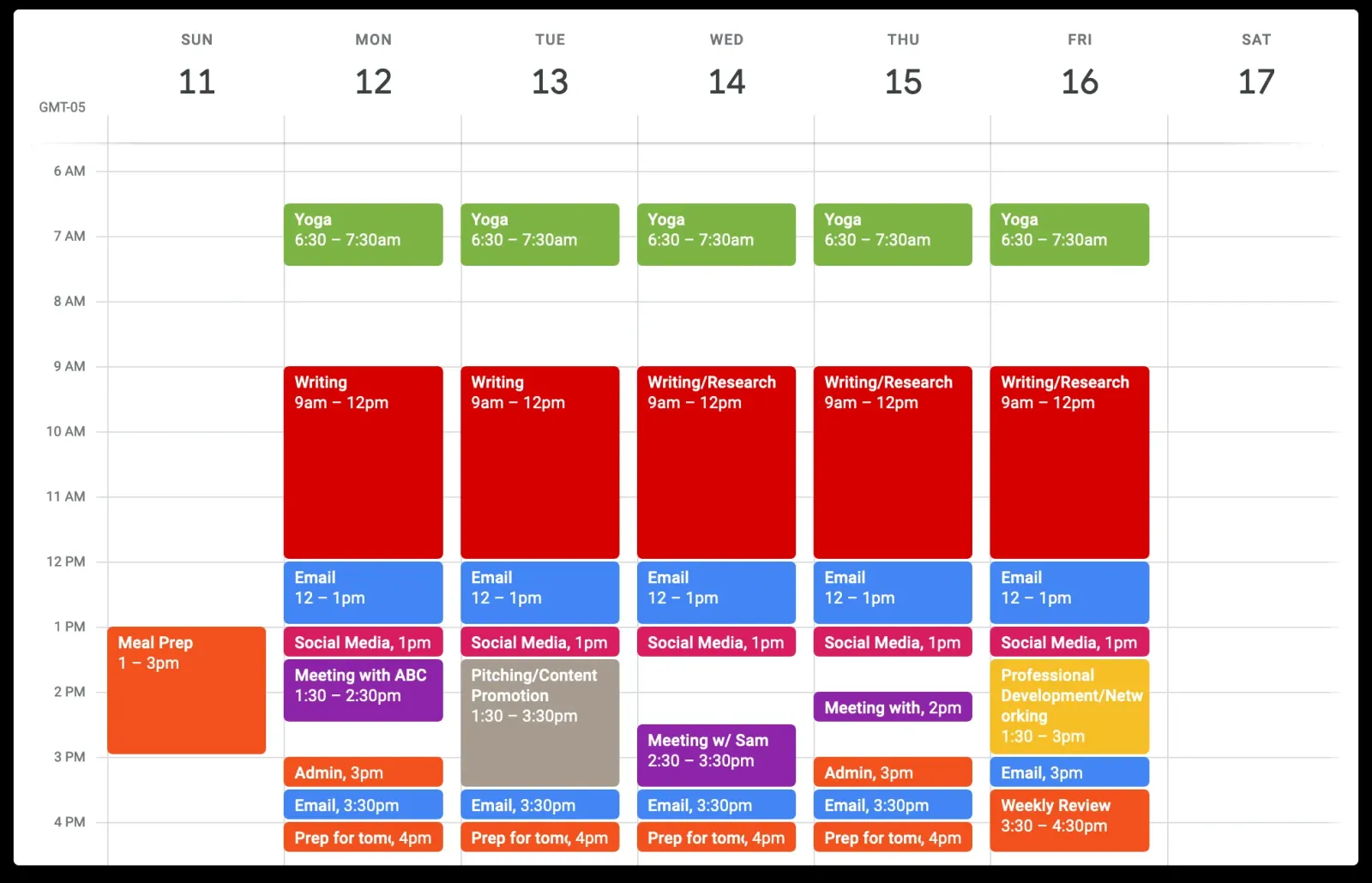

While time blocking and task batching are both powerful productivity hacks time blocking often incorporates, they are distinct concepts that work synergistically. Understanding what’s the difference between time blocking and task batching? is key to effectively implementing both for maximum efficiency.
Let's break them down:
Time Blocking:
-
Definition: Time blocking is a time management strategy where you schedule specific blocks of time in your calendar for specific tasks or categories of tasks.
-
Focus: It's about when you will do the work. It commits a specific time slot to a specific activity.
-
Analogy: Think of it like booking appointments with yourself for your tasks.
-
Examples:
-
9:00 AM - 11:00 AM: Deep Work - Project Alpha (No distractions)
-
11:00 AM - 12:00 PM: Email & Communication (Process all emails, respond to Slack messages)
-
1:00 PM - 2:00 PM: Client Calls
-
-
Primary Benefit: It creates dedicated, uninterrupted periods for focused work (focus strategies for work), reduces procrastination by making a clear commitment, and helps you realistically manage your schedule. It's the structure.
Task Batching:
-
Definition: Task batching is a productivity technique where you group similar small tasks together and complete them all at once during a dedicated period.
-
Focus: It's about how you do the work and what kind of work you group together. It aims to reduce the "context switching cost."
-
Analogy: Think of it like doing all your laundry at once instead of washing one item at a time.
-
Examples:
-
Responding to all emails at a specific time.
-
Making all your phone calls back-to-back.
-
Processing all invoices or expense reports in one sitting.
-
Running all your errands (post office, grocery store, dry cleaning) in a single trip.
-
-
Primary Benefit: It minimizes the mental energy and time lost from switching between different types of tasks. Each time you switch, your brain has to re-engage, costing you time and focus. Batching similar tasks keeps your brain in the same "mode."
How They Work Together (The Synergy):
The power of to-do list vs time blocking comes alive when you combine task batching within your time blocks.
-
Use your To-Do List: First, identify all the individual tasks you need to do (your to-do list).
-
Batch Similar Tasks: Group these individual tasks into logical "batches" (e.g., all emails, all quick admin, all brainstorming).
-
Time Block Your Batches: Then, assign a specific time block in your calendar for each of these batches.
-
Instead of:
-
9:00 AM - Check email
-
9:15 AM - Work on Project Y
-
10:00 AM - Respond to client call
-
10:30 AM - Check email again
-
-
You would have:
-
9:00 AM - 11:00 AM: Deep Work on Project Y
-
11:00 AM - 11:45 AM: Communication Batch (all emails, Slack, quick calls)
-
11:45 AM - 12:00 PM: Admin Batch (invoicing, filing)
-
-
This combined approach leverages the structure and commitment of time blocking with the efficiency benefits of task batching. It reduces the mental friction of constantly switching gears, allowing for more focused, productive work within each allocated time slot. This makes it an ideal part of the best daily planning method for many.
People Also Ask: What’s the difference between time blocking and task batching? What's the difference between time blocking and task batching? is fundamental to efficient planning, even though both are powerful productivity hacks time blocking often leverages. Time blocking is a time management strategy where you schedule specific blocks of time in your calendar for particular tasks or categories of tasks. Its focus is when you will do the work, creating dedicated periods for focus strategies for work and reducing procrastination. Task batching, on the other hand, is a productivity technique where you group similar small tasks together and complete them all at once. Its focus is how you do the work, aiming to minimize the mental cost of "context switching." While time blocking provides the structure (e.g., "11 AM - 12 PM: Admin Time"), task batching defines the content of that block (e.g., "pay bills, respond to voicemails, file reports" all within that "Admin Time"). The most effective approach, often considered the best daily planning method within the to-do list vs time blocking debate, is to combine them: use time blocking to allocate time for batches of similar tasks, thereby boosting overall time blocking vs to-do list productivity.
To-Do List vs. Time Blocking: Your Path to Productivity Mastery
We've journeyed deep into the heart of productivity, dissecting the merits of to-do list vs time blocking. What began as a simple question of "which is better?" has unfolded into a nuanced understanding: neither is inherently superior, but their power lies in knowing when and how to deploy each effectively, or even better, how to blend them.
The humble to-do list, for all its simplicity, excels at capturing the whirlwind of thoughts and commitments, offering a mental offload and a satisfying checklist. Yet, its very nature — a list of intentions without assigned time — is often why do to-do lists sometimes fail, leading to overwhelm and unchecked items.
Enter time blocking, the strategic powerhouse that transforms intentions into appointments. It compels you to confront the reality of your limited time, fosters focus strategies for work by creating dedicated work periods, and is remarkably effective at helping to reduce procrastination more. It answers the "when" of productivity, which is often the missing link in the traditional to-do list approach.
So, does time blocking actually improve productivity? A resounding yes, for those willing to embrace its structure and the discipline it demands. Whether you're navigating the complexities of your daily grind or seeking the best productivity method for ADHD, the intentionality of scheduling your time proves a formidable ally.
The ultimate takeaway? Don't pick a side in the to-do list vs time blocking debate. Instead, harness the strengths of both. Use your to-do list as your dynamic reservoir of tasks, then consciously pull from it to time block your most critical work. Build in flexibility, learn how to stay consistent with time blocking through realistic planning and self-compassion, and remember to include those essential breaks and buffers.
By understanding the difference between time blocking and task batching, and by treating your calendar not just as a place for meetings, but as a commitment to your most important work, you'll gain unparalleled clarity and control. This isn't just about managing tasks; it's about mastering your time, your focus, and ultimately, your output. Go forth and conquer your day, one intentional block at a time!
Maybe you are interested:

Multitasking vs Single-Tasking: Which One Actually Boosts Productivity?

Remote Work vs Office Work: Which One Actually Boosts Productivity?
More Like This


How to Improve Your Life: A Complete Guide to Personal Growth
by Emily Cooper
Why is sleep important? What do you need to know about sleep?
by Emily Cooper